Process-aware AR assistant that understands the invoice collection lifecycle, assesses payment risk, and proposes the right action at the right time.
Explore skills
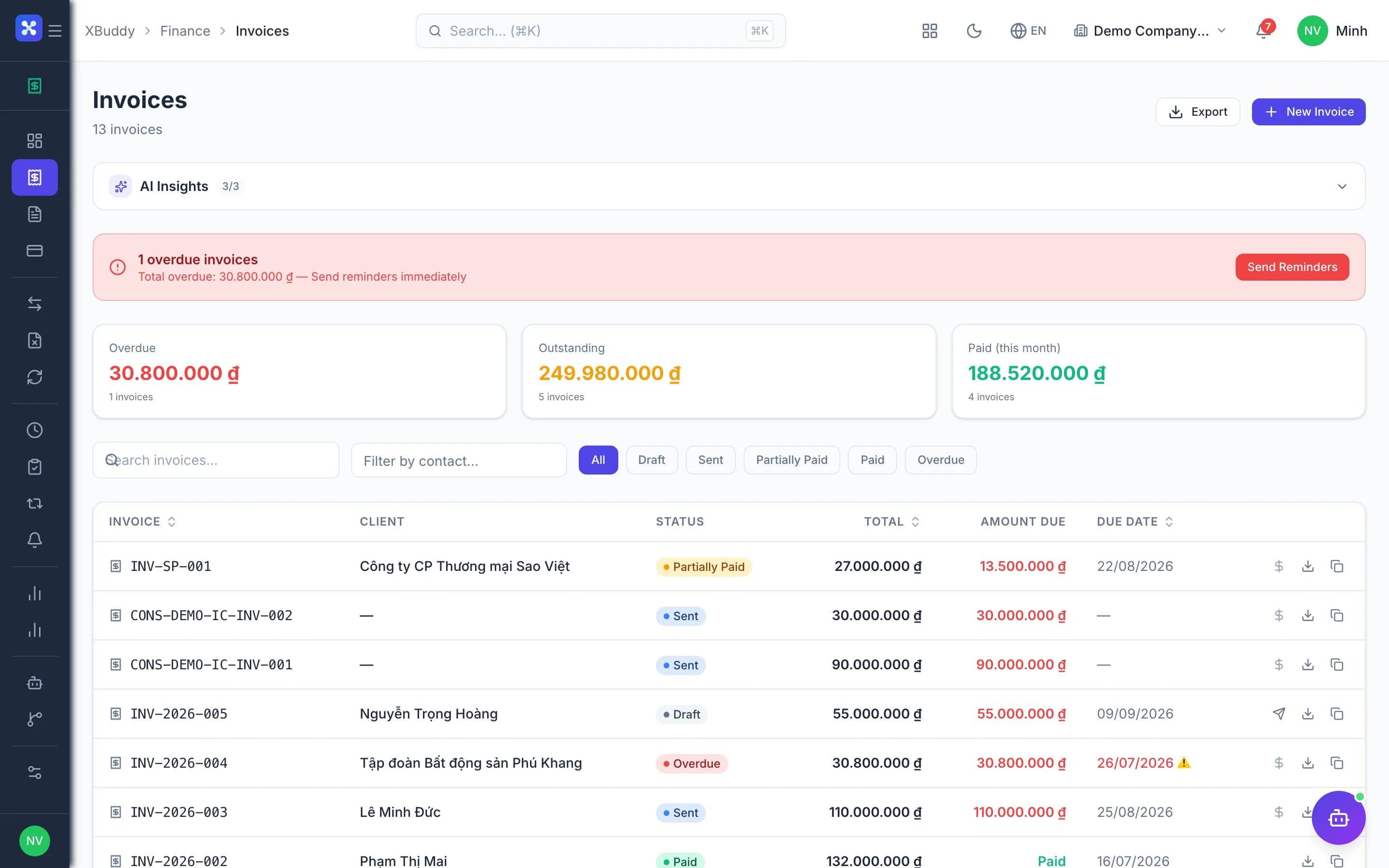
Invoice CollectorMonitors overdue invoices and sends escalating payment reminders at configurable intervals (7, 14, 30 days). Reduces Days Sales Outstanding automatically.
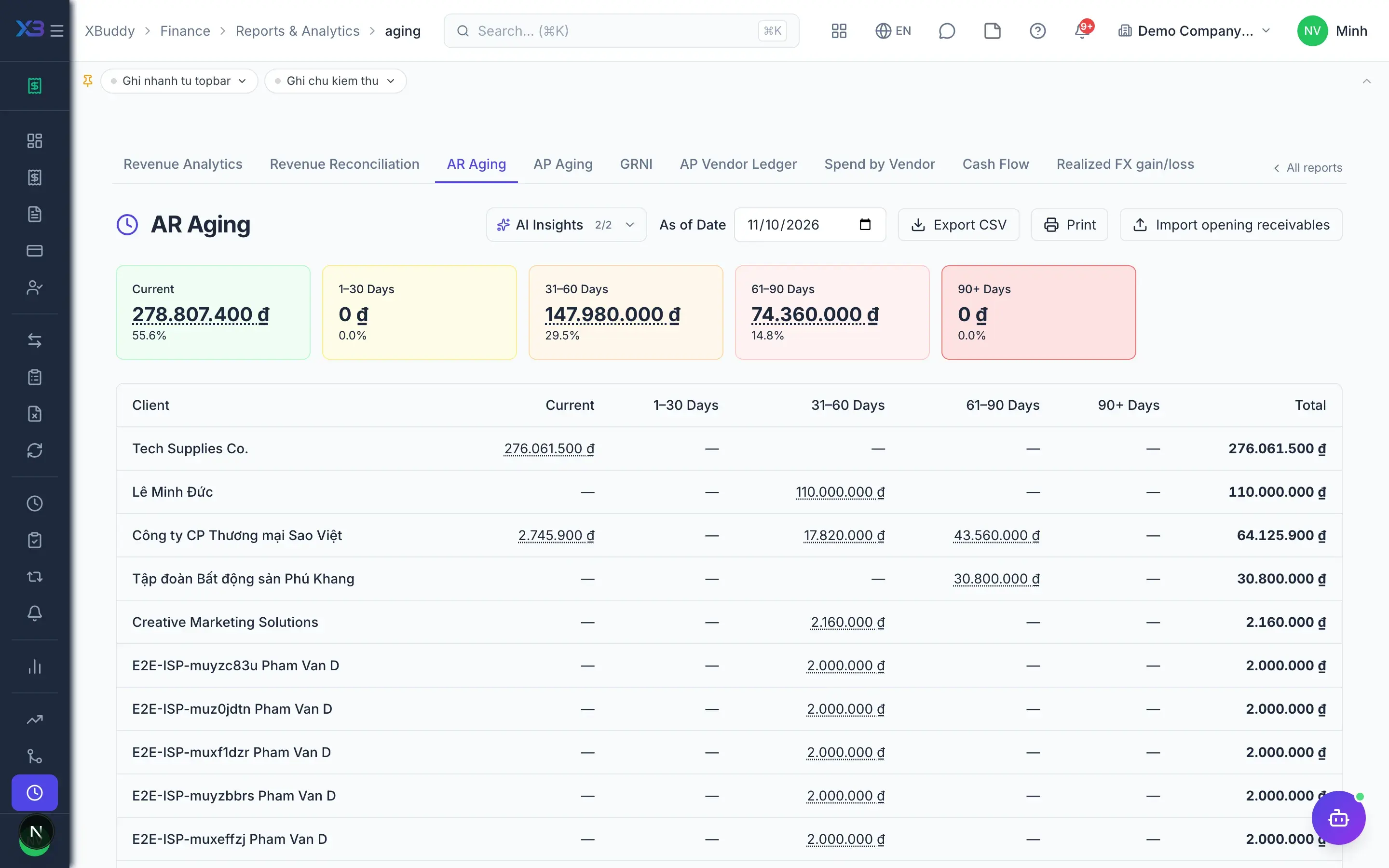
AR Aging IntelligenceAnalyses accounts-receivable aging buckets, prioritises collection actions, and flags high-risk debtors to reduce DSO and improve cash recovery.
Dunning Effectiveness MonitorMonitors dunning run outcomes, identifies invoices resistant to collection policy, and suggests escalation paths for persistent overdue accounts.
Customer Concentration Risk MonitorMonitors revenue dependency on individual customers. Flags when a single customer exceeds 30% of revenue or the top 3 customers exceed 60%, reducing business continuity risk.
Retainer Utilization AdvisorMonitors retainer contract balances, flags near-depletion and over-used retainers, and alerts on upcoming renewal dates to protect recurring revenue.
Recurring Billing Health MonitorDetects overdue recurring invoice generation, expiring subscriptions, and stale recurring templates to prevent revenue leakage.
Accounts payable assistant — optimizes payment timing, monitors AP aging and DPO, plans payment runs to capture early-payment discounts, prioritizes vendors and flags 3-way match exceptions.
Explore skills
3-Way Match Exception HandlerDetects PO/GRN/Invoice 3-way matching discrepancies including quantity variances, price overruns, and unresolved exceptions requiring finance team action.
AP Aging AnalyzerAnalyzes accounts-payable aging buckets, DPO and overdue exposure; flags at-risk buckets and top overdue vendors.
Payment Run SchedulerProposes an optimal weekly payment batch to capture early-payment discounts and avoid late fees.
Vendor Payment PrioritizerRanks vendors for payment by criticality, terms and overdue exposure.
Duplicate Bill DetectorFlags potential duplicate vendor bills (same vendor and amount within a short window) to prevent double payment.
Early Payment / Discount CaptureFlags bills due soon and proposes scheduling payment to capture early-payment discounts and avoid late penalties.
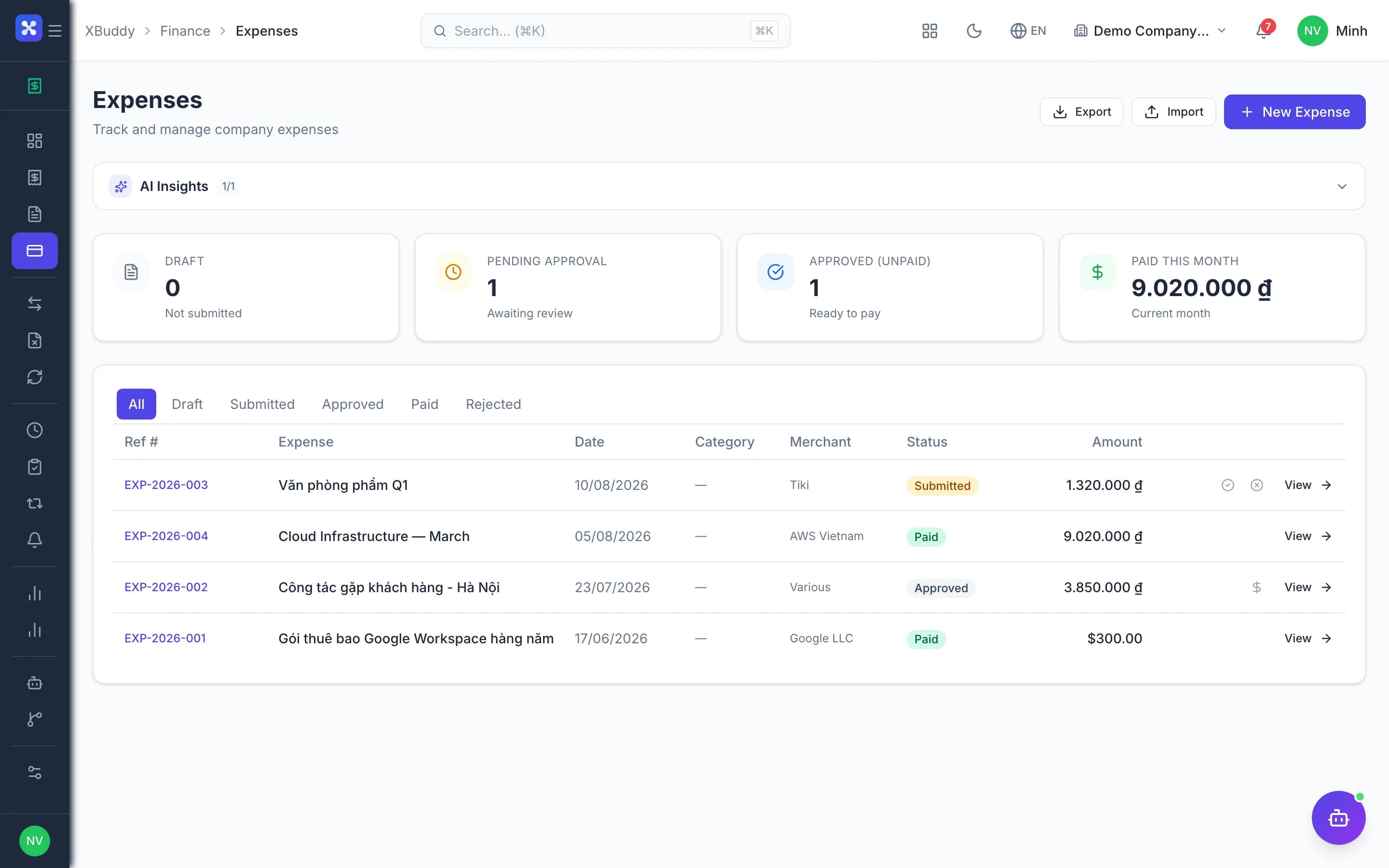
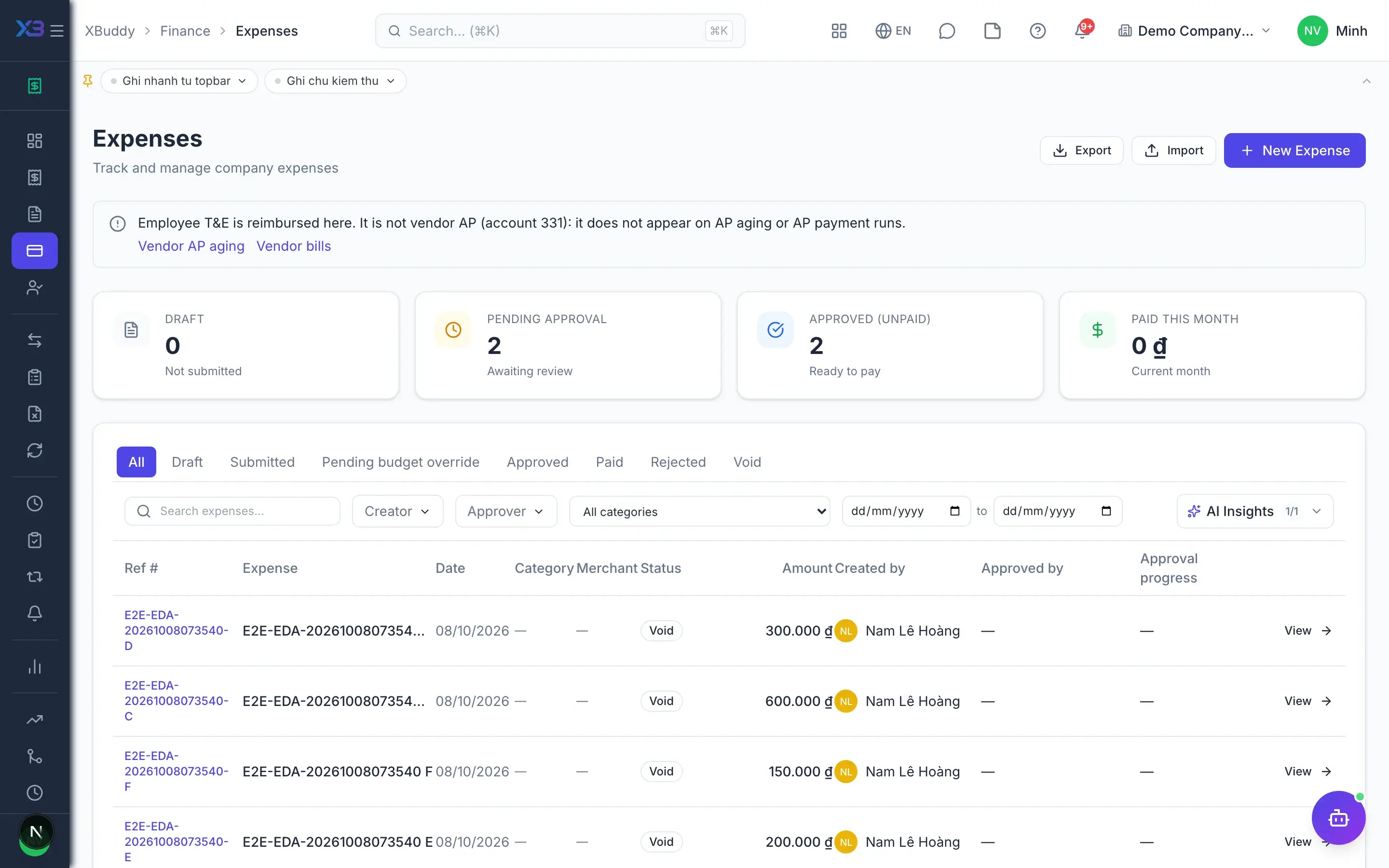
Process-aware agent tracking expense lifecycle and proposing timely approval or escalation actions.
Explore skills
Expense Anomaly DetectorDetects unusual expenses that deviate significantly from historical patterns. Flags potential errors or unauthorized spending for review.
Duplicate Expense DetectorFlags potential duplicate expense claims (same merchant and amount within a short window).
Expense Policy ComplianceFlags expenses that violate policy: missing receipt above the threshold, or over the per-claim limit.
Process-aware agent tracking journal entry lifecycle, flagging drafts left unposted
Explore skills
Chart of Accounts AuditorAudits the chart of accounts for duplicate codes, broken parents, missing balance side and account class
Journal EntryAI-powered journal entry assistant: describe a transaction in plain language and receive DR/CR account suggestions with confidence scores, using your company's chart of accounts and past journal history as context.
Journal Entry ValidatorAudits newly posted journal entries for debit/credit balance, missing mandatory dimensions, account rule violations (debit_only, require_cost_center), and unusual account combinations. Flags entries requiring accountant review before period close.
Accrual Recommendation AgentCompares current month expense accounts against prior year same period to identify missing accruals. Uses AI to suggest up to 3 accrual journal entries before month-end close.
Accounting Anomaly DetectionWeekly scan for journal entry anomalies: duplicate entries, wrong-side account balances, large round-number entries, after-hours postings, and statistical outliers vs 90-day average. AI explains root causes and risk levels.
Recurring Journal MonitorMonitors recurring journal templates daily for overdue entries, failed runs, and auto-post entries stuck in draft. Alerts accountants before issues accumulate at period close.
Prepaid Amortization AgentDetects prepaid expense periods due for amortization each month and proposes posting them in one click. Amounts come from the stored schedule, not an AI estimate — an accountant approves before anything reaches the ledger.
Period Close Status AgentMonitors all period-close checklist items: pending reconciliations, unposted transactions, overdue recurring journals, VAT filing status, bank reconciliation, and KPI calculation progress. Provides a real-time 7-point close dashboard.
Financial CloseEvaluates month-end close readiness by checking for pending journal entries, unreconciled transactions, and open items. Provides a close checklist with priority blockers.
TT99/2025 Compliance CheckerChecks compliance with Vietnam's TT99/2025 accounting standard: verifies all 5 COSO components are assessed, flags stalled standard migrations (>30 days), and highlights high-risk internal control findings.
VAT FilingTracks VAT filing deadlines (due in 15 days or overdue), flags tax accounts with unrecorded balances exceeding threshold, and suggests filing actions. Runs on the 1st, 10th, and 20th of each month.
FX Revaluation AgentAt period-end (days 28–31), identifies foreign currency account balances (USD, EUR, etc.) and suggests revaluation journal entries per TT99/2025 Điều 4 khoản 2. Calculates estimated FX gain/loss using the last posted exchange rate and flags accounts needing official closing rate update from NHNN.
COGS Variance AnalyzerAnalyzes COGS variance between standard cost and actual inventory credits at period-end. Flags accounts with significant discrepancies (>1M VND) and uses AI to suggest specific cost adjustment journal entries (TT99: TK 6xx vs TK 15x/16x reconciliation). Runs on days 25–28 of each month.
Tax Compliance AuditorAnalyzes transactions and tax configurations to identify compliance risks, missing tax applications, and regulatory exposure. Scores overall compliance posture.
Intercompany ReconciliationAutomatically reconciles intercompany invoices and purchase bills, flags unmatched transactions, and suggests elimination journal entries for consolidated reporting.
Cost Center Variance AnalystMonitors budget vs actual spending for each cost center, flags overruns with variance percentages, and identifies departments exceeding budget thresholds.
Bank ReconciliationDaily scan of bank transactions to identify entries that have not been matched to invoices or bills. Uses AI to suggest the most likely match and flag transactions that require manual review.
Payment Reconciliation AgentMatches AR invoices and AP bills with payments on the 1st and 15th of each month. Flags overdue items beyond 30 days, highlights critical items over 90 days, and recommends follow-up or write-off actions. No AI calls — pure rule-based matching.
Financial KPI Alert AgentMonitors key financial ratios (current ratio, debt-to-equity, gross margin) against configurable thresholds. Uses AI to explain root causes and recommend corrective actions when KPIs fall outside safe ranges.
Forecasts cash flow, analyzes revenue trends, and monitors budget variance and cross-domain anomalies.
Explore skills
Bill Payment AssistantProposes bill approvals and concrete payment runs for bills due soon — every write is confirmed by you before it executes
Revenue Trend AnalyzerAnalyzes monthly revenue trends over the last 6 months, detects significant growth or decline (>15% MoM), surfaces seasonality patterns, and recommends corrective actions.
Budget ForecastingForecasts month-end spending based on actual trends, identifies departments at risk of budget overrun, and recommends reallocation opportunities.
Budget Variance AlertCompares actual departmental spending against approved budget lines every week. Forecasts month-end overspend and alerts the finance team before budgets are breached.
Cross-Domain Anomaly CorrelatorSynthesizes anomaly signals from multiple domains (finance, HR, operations, sales) to detect systemic patterns and root causes that single-domain agents may miss.