Quality

Standard inspections, and every defect followed through to closure

Quality checks on inbound, in-process and outbound goods, with corrective action records.

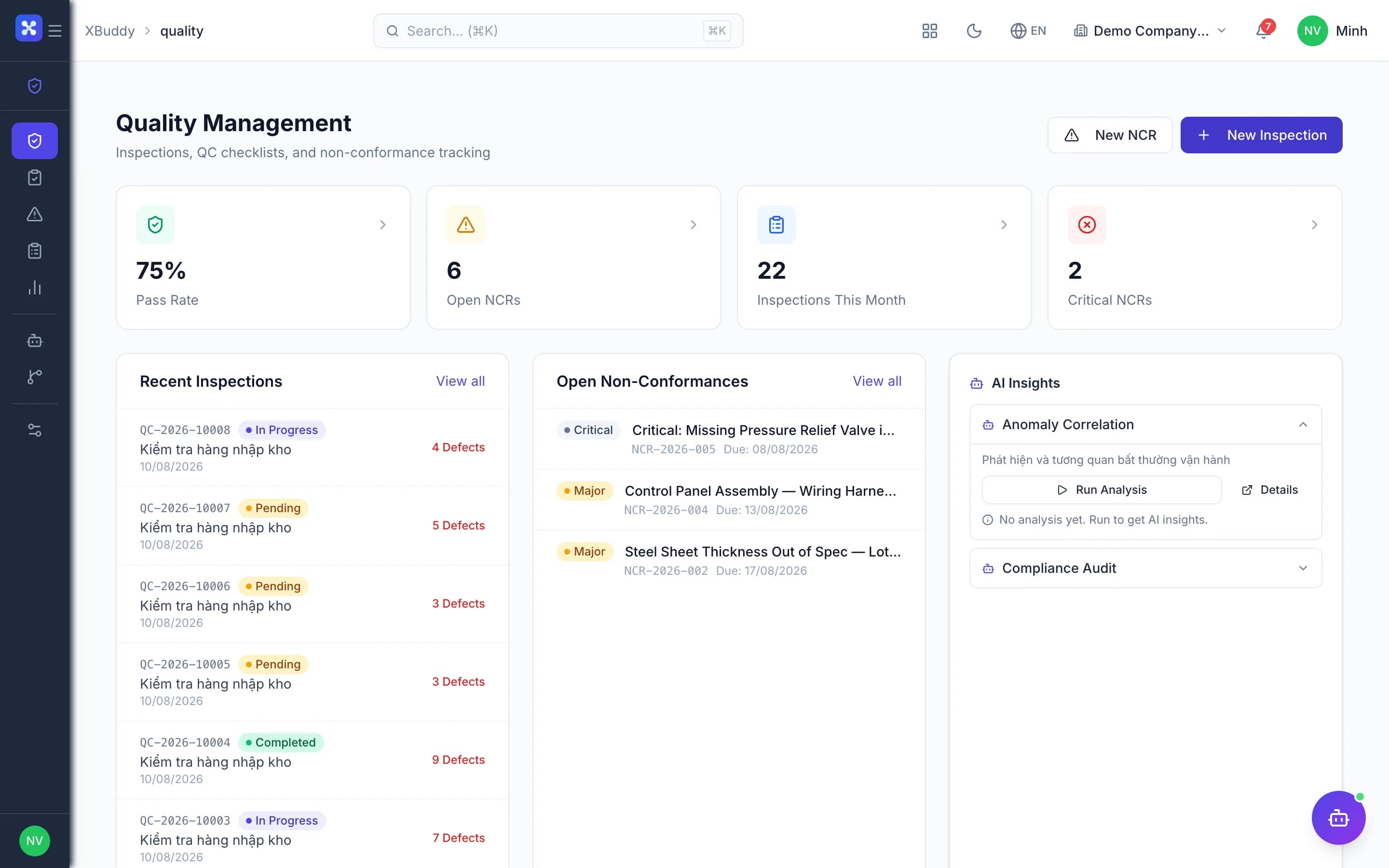
  • Inspection templates with tolerances and automatic verdicts
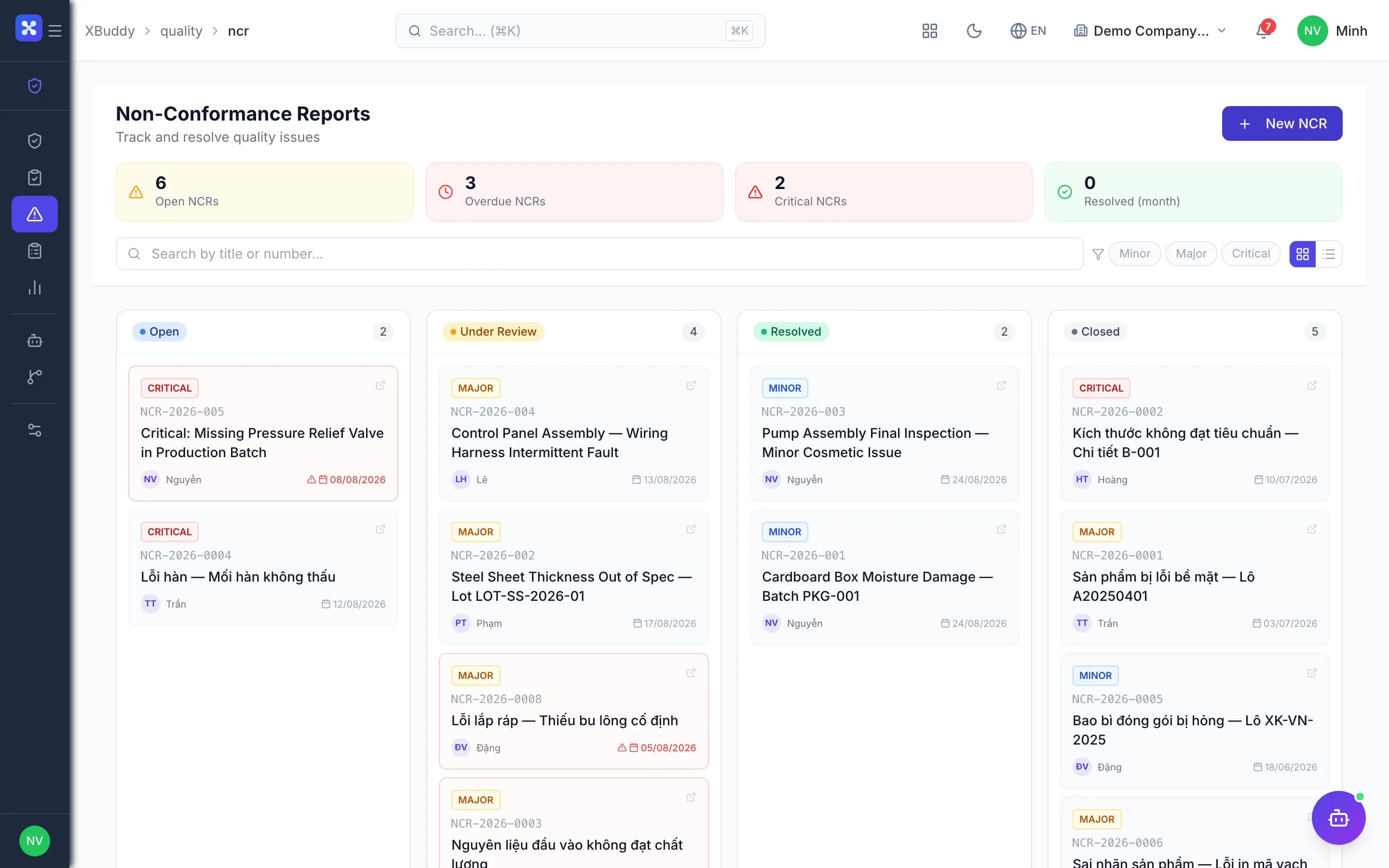
  • Every non-conformance has an owner and a due date
  • Inspections link directly to receipts, POs and work orders
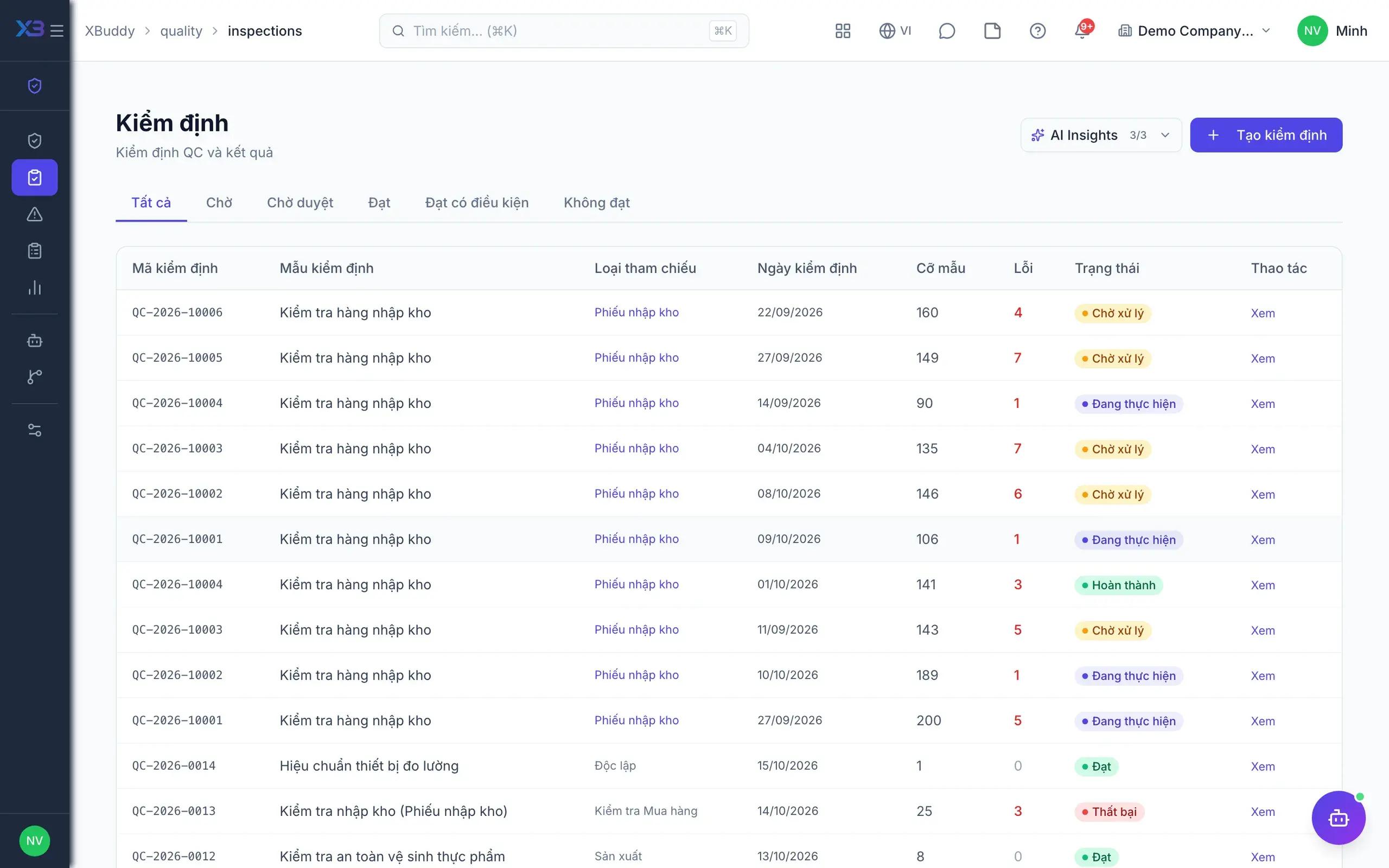
Quality — product screen

Screenshot 1 of 8

21
capabilities
9
advanced & AI features
1
AI assistants on this data
Web
on mobile

Sound familiar?

The problems this app removes

  • Inspection results live on paper, each inspector their own way
  • Defects get found, then forgotten with nobody following up
  • Failed goods still slip into stock and get used

Capabilities

21 capabilities in Quality

Catalogued against screens that exist in the product, grouped by the work they do — not a flat marketing list.

Inspections

6
  • Templates with tolerances

    Build templates with check items and min/max values; out-of-tolerance results fail automatically.

  • Inspect from GRN, PO, work order

    Create inspections pre-filled with lines from the source document and linked into its document chain.

  • Auto-inspect on receiptAdvanced

    Confirming a goods receipt automatically creates an inspection for the newly arrived goods.

  • Automatic verdictsAdvanced

    The system concludes pass, conditional pass or fail based on the results of each check item.

  • Line-level disposition

    Record results and decisions separately for each item line within the same inspection.

  • Mobile inspectionsMobile

    Enter inspection results and raise NCRs on the spot from the mobile app.

Approval & hold

3
  • Inspection approval

    Passing results go through an approval step before goods can be used, per company process.

  • Hold and releaseAdvanced

    Failed goods are held automatically and released only when an authorised person confirms resolution.

  • Custom approval workflowsAdvanced

    Design dedicated approval flows for inspections and NCRs with the Workflow builder.

Non-conformance (NCR)

5
  • Single or bulk NCRsAdvanced

    Raise NCRs manually or automatically on failed inspections, assigning an owner with a due date.

  • Full NCR lifecycle

    Open, review, resolved, closed; root cause and corrective action are required along the way.

  • Corrective action verification

    Corrective actions must be verified with notes, and closed NCRs can still be reopened.

  • Overdue and unverified NCRs

    Dedicated lists of late or unverified NCRs so managers can chase them in time.

  • Comments and attachments

    Discuss and attach photos and files right on the NCR, stored in the shared document library.

Quality reporting

3
  • KPIs versus last period

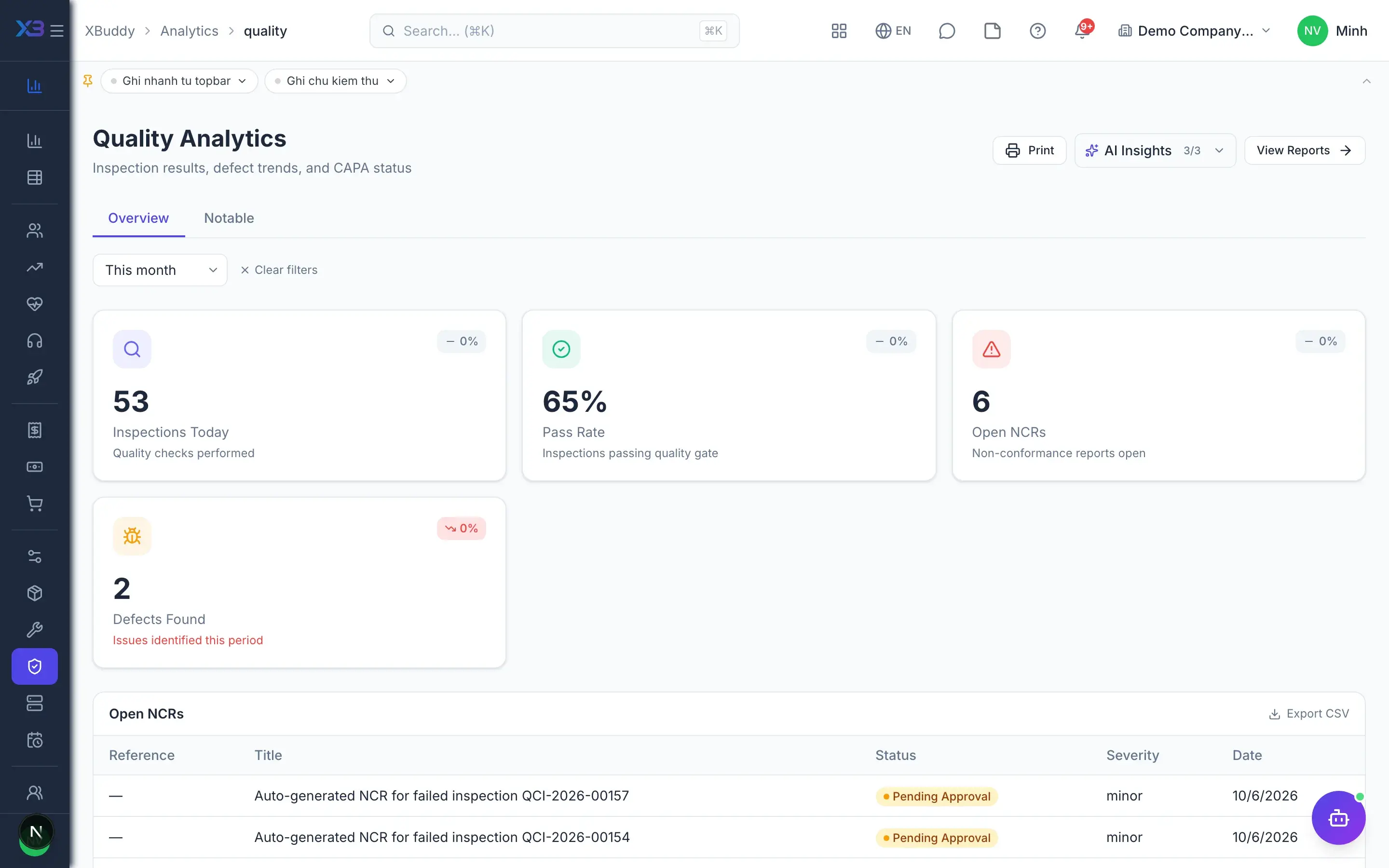
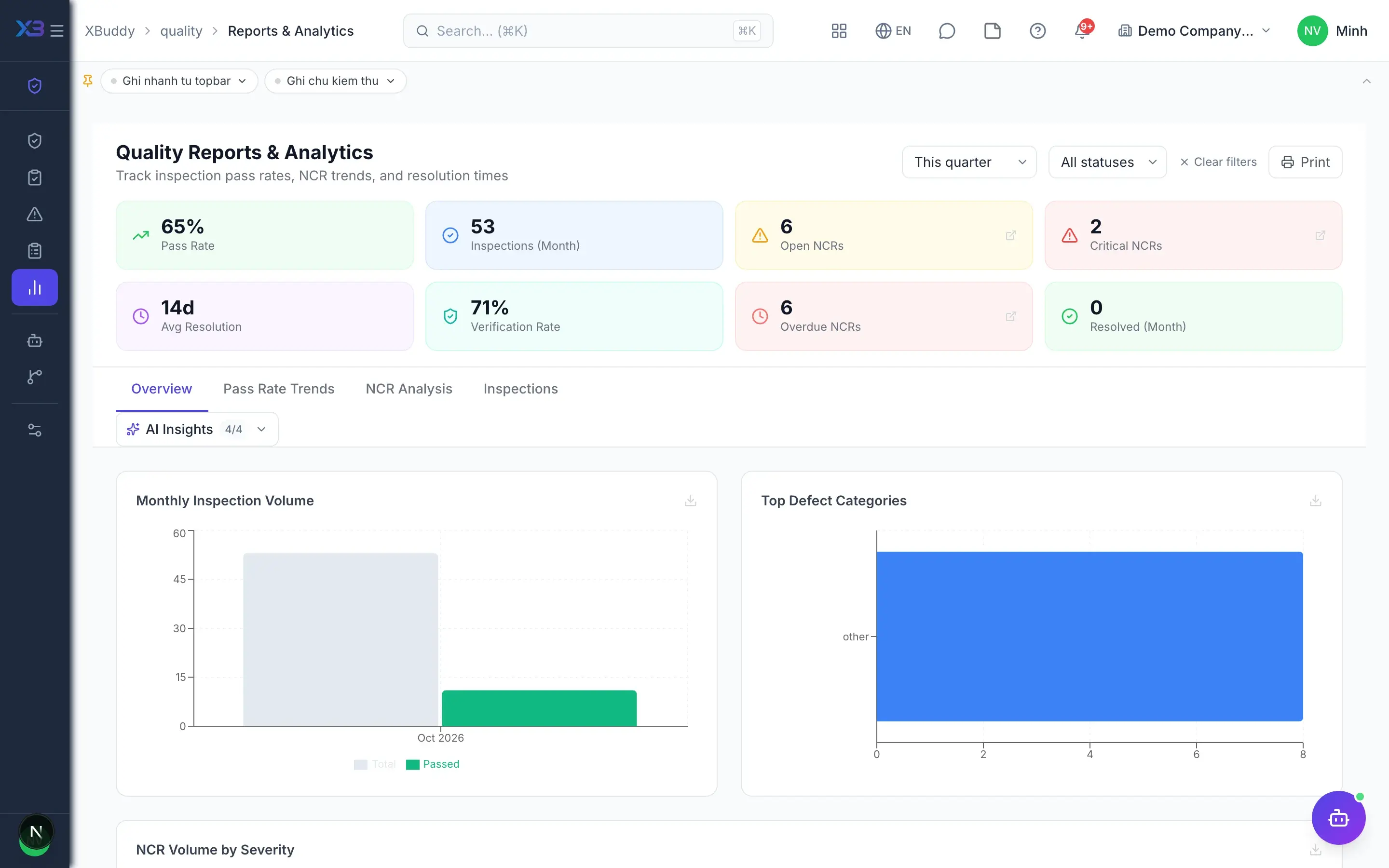
    Overview of pass rate, NCR count and resolution time, compared directly with the previous period.

  • Trend reports

    Track defect trends over time, by item and by supplier, to prioritise improvement work.

  • Quality by supplier

    Inspections tied to POs and receipts reveal which suppliers deliver defective goods most often.

AI assistant

4
  • Defect and NCR trend analysisAI

    AI analyses recurring defect causes and NCR trends, suggesting escalation when it is needed.

  • SPC control limitsAI

    AI tracks pass rates and statistical control limits to warn when a process drifts.

  • Supplier quality trackingAI

    AI scores each supplier's quality from its inspection and NCR history.

  • Bundled production planning skillsAI

    Includes AI skills for production scheduling, WIP, BOM cost and material shortage forecasting.

Real screens

Inside Quality

Quality — product screen
Quality — Two-step inspection submit with pass/fail results

In practice

When you reach for it

1

One supplier causing repeat defects

Each incident looks like an accident; only accumulated data shows the pattern.

  1. 1.Every non-conformance links to its lot and originating supplier
  2. 2.Trend analysis groups by supplier and defect type
  3. 3.The result feeds straight into the vendor scorecard

Renegotiate the contract on evidence rather than on impressions.

Assistants on this app

1 assistants work on this data

Each assistant carries its own skills on this app’s data, inside the caller’s permission scope.

Process-aware agent tracking work order production lifecycle, flagging overdue or unassigned orders

Explore skills
  • Production Schedule OptimizerFinds double-booked work centres, unscheduled work orders and late starts in the production plan
  • Yield ImprovementMeasures production yield and scrap concentration by work centre on completed work orders
  • WIP MonitorTracks work-in-progress on the shop floor: completion, ageing, scrap and stalled work orders
  • NCR Trend AnalyzerAnalyzes non-conformance reports over 30 days, groups by defect type and supplier, and flags repeat offenders. Highlights quality trends before they escalate.
  • NCR Escalation AgentMonitors open non-conformance reports and escalates NCRs that are overdue for corrective action response. Tracks resolution cycle times and flags repeat offenders.
  • Quality Defect AnalystIdentifies recurring defect patterns across QC inspections grouped by product, supplier, and production period. Highlights systemic quality issues requiring corrective action.
  • Inspection Pass Rate MonitorTracks QC inspection pass rates by product, supplier, and inspection type. Alerts quality team when pass rates drop below configured thresholds. Trend analysis over 4 weeks.
  • SPC Control Limit MonitorMonitors production quality using statistical process control charts, flags out-of-control points, and alerts quality teams to process drift before defects accumulate.
  • Supplier Quality Audit TrackerSchedules and tracks quality audits for suppliers, flags overdue and upcoming audits, and surfaces suppliers with declining audit scores.
  • BOM Cost AnalyzerCompares planned BOM material costs versus actual consumption costs for completed work orders. Identifies cost overruns, scrap rate issues, and substitution opportunities.
  • Material Shortage PredictorChecks material requirements for scheduled work orders against current stock levels. Predicts shortages before they halt production and suggests emergency sourcing.
  • Production Capacity PlannerAnalyzes work center utilization rates across scheduled production. Identifies bottlenecks and over/under-utilized capacity. Recommends load balancing or scheduling adjustments.
  • Work Order Delay MonitorIdentifies work orders past due date or behind schedule based on planned vs actual completion. Alerts production managers with root-cause suggestions.

FAQ

Frequently asked

Must every incoming batch be inspected?

No. Auto-inspection on goods receipt is optional and off by default; turn it on when you need it.

Is there a separate CAPA module?

Corrective action and verification live inside the NCR, so all defect handling is tracked in one place.

Do inspections connect to manufacturing?

Yes. Inspections can be created from work orders and appear on the work order's quality tab.

See Quality running on your data

A thirty-minute demo focused on the process you are actually stuck on.